Amazon FBA 101
- Λήψη συνδέσμου
- X
- Ηλεκτρονικό ταχυδρομείο
- Άλλες εφαρμογές
Hoping to start selling on Amazon FBA or switch from FBM? Interested in selling out to aggregators? No need to scour the internet with questions like “What is Amazon FBA?” or “what are the best things to sell on Amazon FBA?”. We have your answers right here. Come learn the basics of FBA Amazon from your SellerEngine experts.
If you’re thinking of selling on Amazon, you’ve surely asked yourself the question “What is Amazon FBA and is it right for my business?” It’s a valid question, considering most sales go through the Buy Box these days, and many featured offers are either FBA or Amazon’s.
But seasoned sellers might ask the same question, especially if they’ve heard of the sell-out trend. It involves switching to FBA to expand and grow the business quickly, and then selling out to Brand Aggregators. If you’re one of them, you’re not wrong. Aggregators have been known to pay top dollar for FBA businesses.
But with so much outdated information out there, Googling “FBA Amazon” might not help. And even Amazon Seller University can leave out important information. But we’ll take you through the basics, including pros and cons, costs, and which are the best things to sell on Amazon FBA.
What is Amazon FBA?
Amazon is an e-commerce platform. But since the year 2000, it’s also a marketplace for merchants. This includes third-party sellers (3P), who ship the items they list to buyers using Seller Central. It also includes first-party vendors (1P), who supply products in bulk to Amazon via Vendor Central.
Over the years, two separate order fulfillment networks emerged on Amazon: the Amazon Fulfilled Network (AFN) and the Merchant-Fulfilled Network (MFN). But as sellers flourished, setting up unique business models and hybrid operations, Amazon needed to branch out.
So, in 2006, Fulfilled by Amazon (FBA) was launched. It’s a program that gives third-party (MFN) sellers the option to have their inventory fulfilled by Amazon through its own network (AFN). In effect, it bridges the two networks.
How does FBA work?
Sellers list items on Amazon. They select units to be fulfilled by Amazon. They then ship them to fulfillment centers for processing at Amazon’s discretion. Amazon will then handle delivery, customer queries, returns, and refunds on their behalf.
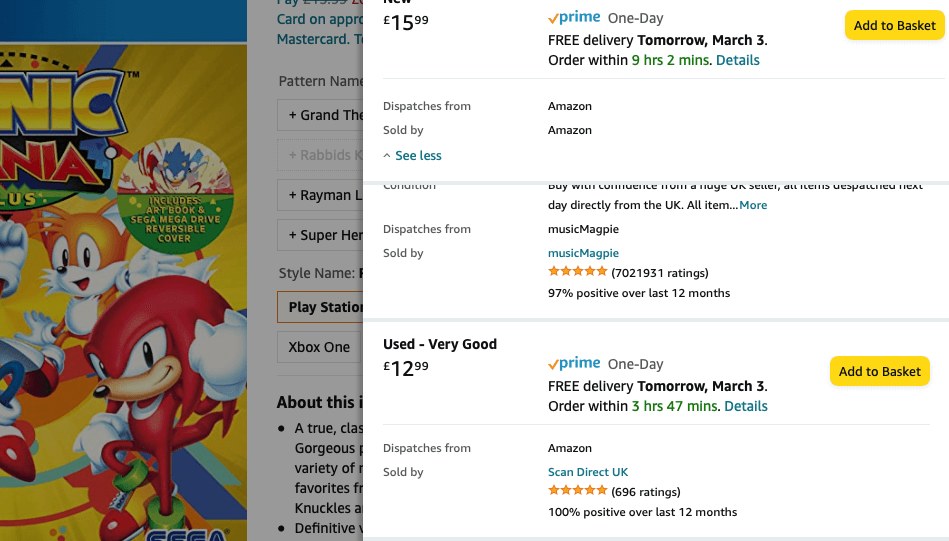
Buyers can easily tell FBA offers apart from FBM offers, but not from Amazon’s own offers. That’s because Amazon and FBA offers say the item is shipped by Amazon via Prime (e.g., 1st and 3rd offers below). FBM offers mention only the seller’s name instead (e.g. 2n offer).
To FBA or Not to FBA
…that is the question people ask themselves as soon as they start selling on Amazon. We discussed the pros and cons of FBA in great detail on this blog. But let’s recap some of FBA Amazon’s greatest benefits and drawbacks.
7 Pros of Amazon FBA:
- The use of the Prime badge, which attracts Prime buyers with full, student, and Amazon Household membership, as well as any 1-month free trial subscribers.
- The ability to compete with Amazon, Amazon Warehouse, FBA, and SFP sellers on an equal footing.
- Eligibility for the Buy Box and precedence over FBM offers.
- Multi-channel Fulfillment (MCF) options, allowing Amazon to store your items all over the globe and ship it to customers from other marketplaces or even your own website.
- Access to Amazon’s infrastructure, which includes FBA fulfillment centers and sorting centers across the USA, ensuring proximity to buyers and faster deliveries.
- Deliveries and redirections tailored to the buyer’s needs, including Amazon Key, Amazon Hub lockers and in-store counters, Amazon Scout, and one-time password.
- Multilingual, round-the-clock customer service over phone, email, chat, and social media, driven by Amazon’s customer obsession principle.
7 Cons of Amazon FBA:
- Amazon decides where everything is stored and which fulfillment centers you should ship your items to. You might need to split shipments, even single-SKU ones.
- Amazon can prioritize and suspend shipments at will.
- Problem Solvers can mark your items as stranded or unsellable even if they’re not yours, especially if you use commingled inventory and/or virtual tracking.
- The hassle-free return policy makes you a sitting duck in the face of counterfeiters and serial returners.
- You lose out on brand awareness and engagement because everything’s shipped in Amazon boxes. People often aren’t even aware they didn’t buy from Amazon itself.
- Sales tax gets more confusing. You must collect and remit sales tax to certain states, if your office, warehouse, store, staff, affiliate, drop-shipper, or trade show booth operates there. The only exceptions are sales tax holidays and states where Amazon can collect and remit sales tax on your behalf. But as BigCommerce points out, you’re still responsible for filing tax returns and holding a valid sales tax permit in those states.
- There are several extra fees to consider, which we’ll discuss below.
How Much Does FBA Cost?
As explained in great detail in our 2022 Complete Guide to Amazon Fees, FBA Amazon sellers pay the same referral fees as FBM sellers. So, depending on the product category, they hand over 8%-45% of the total sale price to Amazon. Or the minimum referral fee (usually $0.3), if higher.
They also pay their selling plan fees, regardless of how many of their orders they fulfill themselves. This amounts to $39.99/month for the Professional Plan. Those who opt out can pay $0.99/unit sold instead, but the Pro plan pays for itself once their monthly sales volume hits 40.
On the plus side, Amazon sellers spend and waste less to ship their boxes and pallets to a fulfillment center, as opposed to sending packages to individual buyers. Also, FBM shipping credits rarely cover the true cost of shipping a product. So, FBA is more attractive in terms of shipping costs.
Even so, FBA sellers often end up paying more in fees than FBM sellers. As the Cost Calculator and the Revenue Calculator will show, it’s small and light items that tend to yield higher profits with FBA, whatever the category. You could say these are the best things to sell on Amazon FBA.
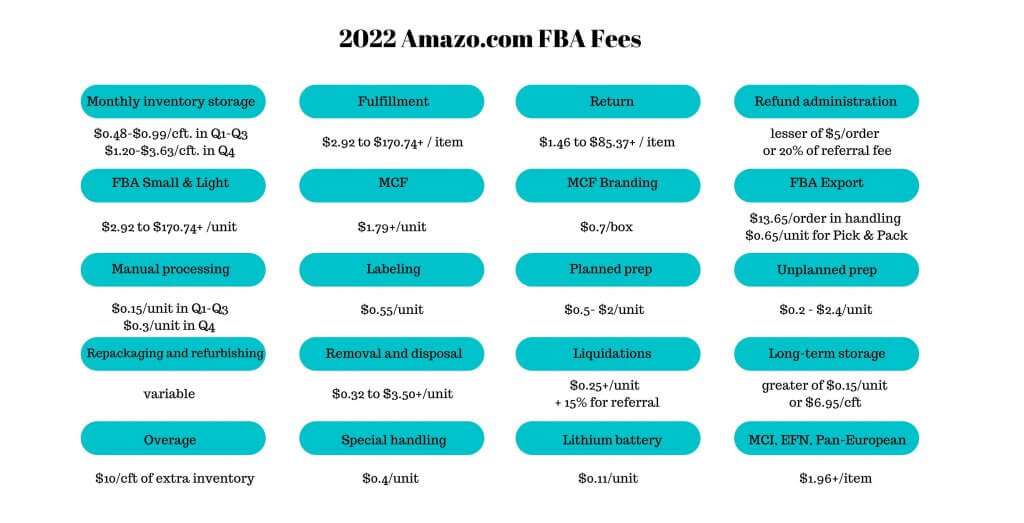
But before you decide where to store and ship your inventory, you should know that there are FBA Amazon fees that are not included in these calculations. For instance, below are 20 fees you should budget for before sending items off to a fulfillment center.
Then there’s also the risk that FBA will reject your inventory if you go over your storage limit. This happens when your IPI score at either one of Amazon’s biquarterly reviews is too low. The minimum IPI score for Q2 is currently 400, and the second review is in the last week of March.
FBA, FBM, or SFP?
For sellers who are just starting out, Amazon FBA fulfillment might seem like the obvious choice. At least until they sort out their warehousing, logistics, staffing, and customer care operations. Especially since they can switch from FBA to FBM at any time.
But there’s another option: Seller-Fulfilled Prime (SFP). It entails storing and shipping items by yourself. You get to don the Prime badge. Amazon’s customer service will handle your buyers for you. But you can only ship same-day, with approved carriers, and with Buy Shipping labels.
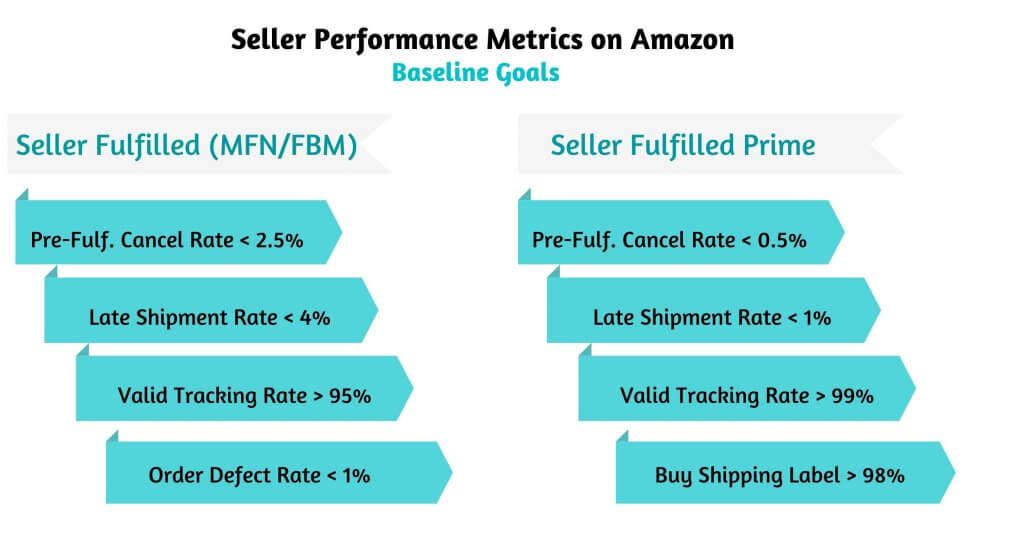
Not everyone can switch to SFP, though. Sellers who join the waitlist need to gain and maintain stellar metrics, as seen below. Also, since Feb. 2021, SFP sellers must comply with Amazon’s requirement for 2-day nationwide delivery. Also, they must support Saturday pick-up and delivery.
7 Ways to Minimize FBA Costs
Before you decide on a fulfillment channel, you should first compare them on even ground, with none of the frills and distractions. Amazon FBA can be very costly due to unforeseen fees, but so can FBM. Trimming your spending will give you a sense of what margins you can really expect.
There’s not much you can do to minimize FBM costs, other than economize, negotiate carrier costs, consolidate shipping, and opt for lighter and more compact packaging material. But there are many ways to keep your FBA costs down and make it a viable option for your business:
- Use a real-time repricer like Sellery. It can make your prices more competitive, boost sales by winning you the Buy Box, and lower the costs relative to profits.
- Try a top-shelf software tool to monitor stock levels and send shipments based on sales levels, seasonal patterns, and realistic assessments of FBA’s processing capabilities.
- Label the items yourself. This way, you don’t need to cover return and refund costs for other seller’s inventory due to mix-ups from commingled inventory and virtual tracking.
- Use good-quality packaging to reduce damage, drop test your items, and watch the FBA packing video playlist on YouTube before you ship.
- Apply Transparency codes, if you’re a brand owner, to minimize the risk of competitors counterfeiting or serial returners swapping your items.
- Monitor inactive inventory and relist, liquidate, dispose of, or remove any unsellable or stranded inventory before it starts to incur monthly or long-term storage fees.
- Bring your IPI score in line with requirements by optimizing listings, improving feedback scores and ratings, and investing in campaigns.
That’s Amazon FBA for you, in a nutshell. We hope we’ve answered all your questions and spurred your next FBA Amazon ideas. After all, what is Amazon FBA, if not an excellent opportunity to reach out to affluent Prime members and win the Buy Box?
But if you’d like to know more, our Business Coaching team is here to help. It’s what we do best, and we’ve been doing it for the best part of two decades, so please feel free to give us a nudge.

Melanie takes an active interest in all things Amazon. She keeps an eye on the latest developments and keeps Amazon sellers up to speed.
The post Amazon FBA 101 appeared first on SellerEngine.
- Λήψη συνδέσμου
- X
- Ηλεκτρονικό ταχυδρομείο
- Άλλες εφαρμογές


Σχόλια
Δημοσίευση σχολίου